
Access the settings and discover everything you can do as an administrator of your company on Nibol.
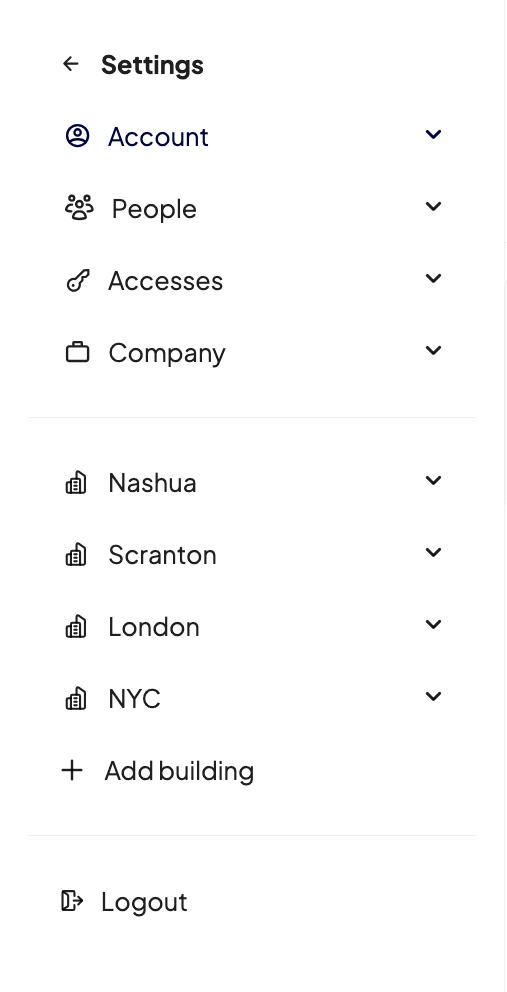
In this section you have at your disposal not only your profile settings, but also those relating to your company as its administrator. Let's look at them together:
Account
Here you can complete your user profile with some information about you visible to other colleagues, enter your preferences related to the workplace, decide which notifications to keep on and which not, change your password (if you have not activated the login with SSO) and finally - only for companies that have Spaces on Demand active - view the available budget and the co-workings saved as favorites.
Learn more about account settings here.
People
This section allows you to create and manage the list of your company's users and groups.
Here's what you can do in the People section.
Accesses
If you have purchased the Access module, in this section you can manage settings related to access points and permissions for your employees.
Learn more about what you can do in the Access section in this article.
Company
Here you can enter all the information related to your company, including billing information and payment method to be able to use Nibol. In addition, you will have a section dedicated to integrations and services dedicated to those with the Enterprise plan.
Read here an in-depth analysis of the Company's settings.
Settings related to the buildings created
Once you have created one or more company buildings, you will have a section dedicated to the settings where you can complete the set-up of the spaces: opening days and times, business spaces, bookable entities, deliveries, external visitors.
See here what you can do specifically in building settings.